

Privileged and Break Glass Access Governance for Enterprise Business Card APIs
Emergency Break-Glass Access Governance for Business Card APIs | Approve, Limit, Expire and Audit It
When an incident blocks business card orders, teams need emergency access fast, but uncontrolled admin access creates new risk. This video explains how to govern break-glass access to business card APIs so urgent fixes stay fast, limited and fully reviewable.
Controlling exceptional authority across CCA governance, BCM ordering and BOC oversight.
Exceptional Access Must Remain Governed
Enterprise integrations occasionally require authority beyond ordinary operations. A production incident may block orders, a provider outage may require controlled rerouting, or a security response may require immediate suspension of a compromised consumer. These events create pressure to grant broad access quickly. If the emergency path bypasses normal governance, a temporary fix can become an unexplained entitlement with the power to alter identity, approval or fulfillment outcomes.
Privileged and break glass access governance creates a controlled route for exceptional work. It requires a specific purpose, accountable requester, independent approval, narrowly defined permissions, short duration, continuous observation, automatic expiration and post event review. The objective is not to prevent urgent action. It is to make urgent action fast enough to be useful and structured enough to remain auditable.
Keep the Core Purpose of CCA in Every Emergency
Color Card Administrator is the enterprise authority and governance layer for API-integrated business card programs. CCA determines how approved enterprise facts may influence eligibility, business identity, templates, permissions, approvals, quantities and provider routing. Privileged access must not replace that purpose. It should provide a controlled way to repair, contain or restore governed decisions when normal administration is insufficient.
BCM is the business card ordering management system or software. It manages permissions, approvals, templates, quantities, orders and reporting for authorized transactions. Business Ops Center, or BOC, provides operational visibility, exceptions and reconciliation. During an emergency, CCA governs the exceptional authority, BCM preserves managed ordering controls and BOC supplies the evidence needed to observe and reconcile every action.
Distinguish Privileged Access from Break Glass Access
| Access class | Use case | Expected control |
|---|---|---|
| Standard administration | Routine configuration within assigned duties | Standing role with least privilege and periodic certification |
| Privileged access | Sensitive administration that can change policy or execution | Approved role, strong authentication, monitoring and limited scope |
| Just in time elevation | Short task requiring temporary additional rights | Request, approval, automatic activation and expiration |
| Break glass access | Urgent action when normal control paths are unavailable | Emergency identity, strict conditions, immediate alerting and mandatory review |
| Service recovery access | Controlled repair by an operational or provider team | Task-specific actions, supervised session and reconciliation |
Define High Risk Business Card API Actions
An enterprise should classify actions by their effect, not only by endpoint name. Reading a health status differs from changing the authoritative source for a card field. Viewing an order differs from approving, cancelling or reprinting it. The highest-risk permissions can change public-facing identity, bypass review, increase production quantity, alter fulfillment routing or weaken the evidence used to explain an outcome.
| Control domain | High risk action | Primary safeguard |
|---|---|---|
| CCA policy | Change eligibility, field authority or approval rules | Versioned change, dual approval and effective time |
| Identity data | Override governed business identity values | Allowed fields, documented reason and expiry |
| Templates | Publish or assign a production template | Brand approval and constrained program scope |
| BCM ordering | Approve, cancel, reprint or change quantity | Order-specific authorization and transaction evidence |
| Provider routing | Redirect production or delivery | Approved destination, allowlist and reconciliation |
| Consumer access | Rotate, suspend or revoke workload credentials | Verified target, rapid rollback plan and alerts |
Start with an Emergency Access Policy
The policy should identify which conditions justify elevation, which roles may request it, who may approve it and which actions remain prohibited. It should define maximum duration, renewal rules, session monitoring, evidence retention and the circumstances that require immediate revocation. A vague statement that administrators may act during emergencies is not sufficient because it does not constrain authority.
Predefine common response patterns for order blockage, compromised credentials, incorrect identity output, provider failure and data synchronization incidents. Each pattern should map to the smallest CCA, BCM and BOC permissions needed. Prepared patterns reduce delay without granting unrestricted administration.
Use Dedicated Identities and Strong Authentication
| Identity control | Design requirement | Failure to avoid |
|---|---|---|
| Named administrator | Attribute human actions to one verified individual | Shared administrator account |
| Workload identity | Use one identity per integration and environment | Reusing a service account across consumers |
| Emergency identity | Store separately, test securely and alert on every use | Dormant credential nobody can validate |
| Strong authentication | Require phishing-resistant factors where supported | Password-only privileged access |
| Credential release | Issue secrets or tokens only after approved activation | Permanent possession of break glass credentials |
| Session context | Capture ticket, purpose, target and approver | Unexplained privileged activity |
Constrain Scope Before Activation
A break glass role should not mean unrestricted access to every tenant and program. Bind the elevation to the affected environment, entity, population, template family, order, provider and API operations. Where the incident permits, start with read-only diagnostic access and elevate only the action that resolves the problem. Deny unrelated export, reporting and bulk operations.
CCA should continue to evaluate authoritative policy whenever the emergency action creates or changes a business card decision. If a controlled override is necessary, record the original value, replacement value, governing reason, approver, effective period and reversion condition. BCM should receive only a complete, explicitly authorized transaction rather than an informal instruction to bypass order controls.
Require Independent and Contextual Approval
Approval should come from someone who understands both operational urgency and business impact. Depending on the action, that may include security, the CCA program owner, the BCM owner, brand governance, a source-system owner or provider operations. The requester should not approve their own elevation except under a narrowly defined emergency rule, followed by immediate secondary review.
The approval record should state the incident, requested permissions, affected population, target systems, start time, maximum duration and expected outcome. Generic approval for administrator access cannot demonstrate why a specific high-risk action was necessary.
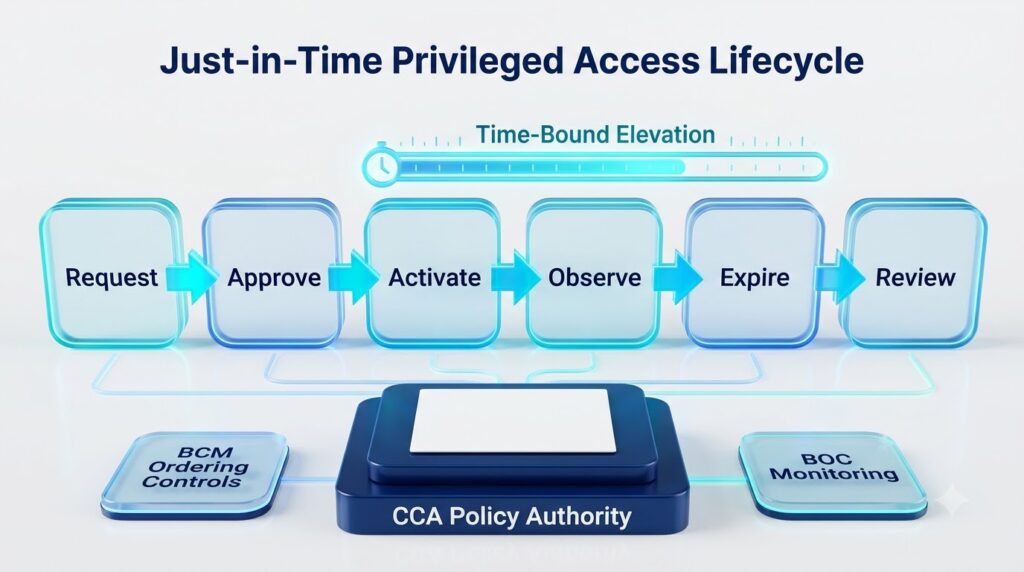
Activate Access Just in Time
| Lifecycle stage | Control objective | Evidence |
|---|---|---|
| Request | Describe the incident and minimum required authority | Ticket, impact, target and requested duration |
| Approve | Validate need and separation of duties | Named approver and decision time |
| Activate | Issue constrained rights only when work begins | Role, scope, identity and activation event |
| Observe | Capture every privileged API and administrative action | Session, decision, order and alert records |
| Expire | Remove rights automatically at the deadline | Deactivation and credential invalidation |
| Review | Confirm outcome, reconcile effects and correct control gaps | Timeline, affected records and actions |
Preserve CCA Decision Integrity
Privileged operators may need to repair configuration or stop an unsafe path, but they should not obscure the difference between source facts, CCA policy and an exceptional override. Preserve the policy version and correlation identifier for each affected decision. If an override changes a field, template, approval or provider route, record both the normal result and the authorized exception.
Use negative tests before enabling a reusable emergency role. Verify that it cannot cross tenant boundaries, publish an unapproved template, order beyond its quantity limit, expose unnecessary personal data or call prohibited bulk endpoints. Break glass should be powerful enough to solve its defined problem and no more.
Protect BCM Ordering Management Controls
BCM is the business card ordering management system or software, so emergency integration actions must preserve its managed transaction model. An elevated user may need to release a held order, cancel a duplicate, correct an approved destination or initiate a controlled reprint. Each action should remain tied to the order, approval state, quantity, template, provider route and reason.
Do not create an alternative production channel that bypasses BCM reporting. If provider instructions must be issued outside the ordinary path, create a governed exception record and reconcile the resulting production and delivery statuses back to the managed order. The enterprise should still be able to answer what was produced, why, for whom, by which provider and under whose authority.
Use BOC for Immediate Visibility and Reconciliation
| BOC signal | Operational question | Required response |
|---|---|---|
| Emergency activation | Who received which authority and why? | Alert security and program owners |
| Privileged action | What decision, order or route changed? | Correlate action to ticket and approval |
| Denied attempt | Was the scope insufficient or was misuse attempted? | Investigate before expanding access |
| Unexpected population | Did the session cross an approved boundary? | Contain and assess affected records |
| Access expiration | Were all elevated rights actually removed? | Verify roles, tokens and sessions |
| Order exception | Did emergency work leave an unresolved lifecycle state? | Reconcile BCM and provider evidence |
Revoke Access Automatically and Completely
Time-bound roles should expire without relying on the operator to remember. End the administrative session, invalidate temporary credentials, remove elevated groups or claims and confirm that cached tokens can no longer call privileged operations. If an extension is required, treat it as a new decision with refreshed context rather than silently extending the original grant.
Revocation must account for in-flight business work. CCA can stop new exceptional authorization while BCM preserves order history and controlled completion, cancellation or hold behavior. BOC should verify that provider status events continue to reconcile without reopening the privileged path.
Conduct a Mandatory Post Event Review
The review should reconstruct the incident from request through revocation. Compare requested rights with actual use, identify every changed policy or transaction, validate the business outcome and confirm that no temporary configuration remains. Examine denied attempts and manual workarounds because they often reveal missing runbook steps or excessive privilege.
A successful outcome does not automatically justify keeping the access. Convert only repeatable, approved needs into a standard least-privilege role. Correct the underlying reliability or control issue so that break glass remains rare. Track remediation with accountable owners and deadlines.
Implement the Control Model in Practical Stages
- Inventory privileged CCA, BCM, BOC, integration, middleware and provider actions.
- Classify standard administration, just in time elevation and true break glass use.
- Define emergency conditions, prohibited actions, approvers, durations and evidence.
- Create dedicated identities and constrained roles for common incident patterns.
- Integrate requests and approvals with activation, session context and automatic expiry.
- Test tenant, population, field, template, quantity, order and provider boundaries.
- Stream privileged activity to BOC for alerts, correlation and reconciliation.
- Exercise the process with a realistic production-safe scenario and verify revocation.
- Require post event review and remove every temporary configuration or credential.
- Use lessons learned to improve CCA policy, BCM workflows and operational runbooks.
Measure Privileged Access Quality
| Measure | What it indicates | Target direction |
|---|---|---|
| Standing privilege | Sensitive rights remain permanently assigned | Decrease toward justified minimum |
| Approval latency | Emergency work waits for accountable authorization | Meet defined response objective |
| Elevation duration | Rights remain active beyond the task | Decrease |
| Scope variance | Actual permissions exceed approved request | Zero |
| Unattributed actions | Activity cannot be tied to an identity and ticket | Zero |
| Expiry success | Elevations end automatically and completely | Complete |
| Review completion | Post event evidence and remediation close on time | Complete |
Frequently Asked Questions
What is privileged business card API access?
It is elevated authority that can change sensitive CCA policy, identity, BCM orders, provider routing or integration security beyond routine duties.
What is break glass access?
It is a tightly controlled emergency path used when normal access or approval mechanisms cannot resolve an urgent risk or service failure.
Why is CCA central to emergency access?
CCA remains responsible for governing how enterprise facts influence business card identity, eligibility, templates, approvals, quantities and routing.
What is BCM?
BCM is the business card ordering management system or software that manages permissions, approvals, templates, quantities, orders and reporting.
Should break glass access be permanent?
No. The emergency identity may exist securely, but elevated authority should activate only for a justified event and expire automatically.
Can the requester approve their own access?
Ordinarily no. A documented extreme-emergency exception should trigger immediate alerting and secondary review.
What should be logged?
Record the request, approval, identity, scope, session, API actions, CCA decisions, BCM transactions, BOC alerts, expiration and review.
How should in-flight orders be handled?
Stop unnecessary new authority while BCM preserves controlled order handling and BOC reconciles provider and delivery events.
How often should the process be tested?
Test it on a risk-based schedule and after material changes to identities, roles, APIs, providers or response procedures.
What should happen after the incident?
Revoke access, reconcile all effects, review the full timeline and remediate the cause without converting emergency rights into standing privilege.
The Strategic Outcome
Well-designed privileged access lets the enterprise respond quickly without abandoning the operating model of its business card program. CCA remains the authority for governed identity decisions. BCM remains the business card ordering management system or software for managed execution. BOC preserves visibility and reconciliation across the exceptional event.
The result is a defensible emergency path: specific enough to control, fast enough to use and temporary by design. Every elevation has an owner, every action has context and every exceptional transaction returns to the governed lifecycle.
Select one realistic high-impact incident, such as a compromised consumer credential or blocked production route, and exercise the full process. Request the minimum CCA and BCM authority, obtain independent approval, activate it just in time, observe it through BOC, revoke it automatically and complete a post event review. Use the evidence to close every gap before the next emergency.